Samsung New DDR5 RDIMM Part Number Decoder
Key Takeaways
- Samsung introduced a new DDR5 RDIMM part number format in 2025
- New part numbers like MDRR644QDBC2 replace the older M321R naming style
- The capacity code tells you module size — 64 = 64 GB, WM = 96 GB
- Speed code D = DDR5-6400, K = DDR5-7200
- 4D0 and 4G0 suffix variants differ only in RCD/PMIC vendor — specs are identical
Introduction
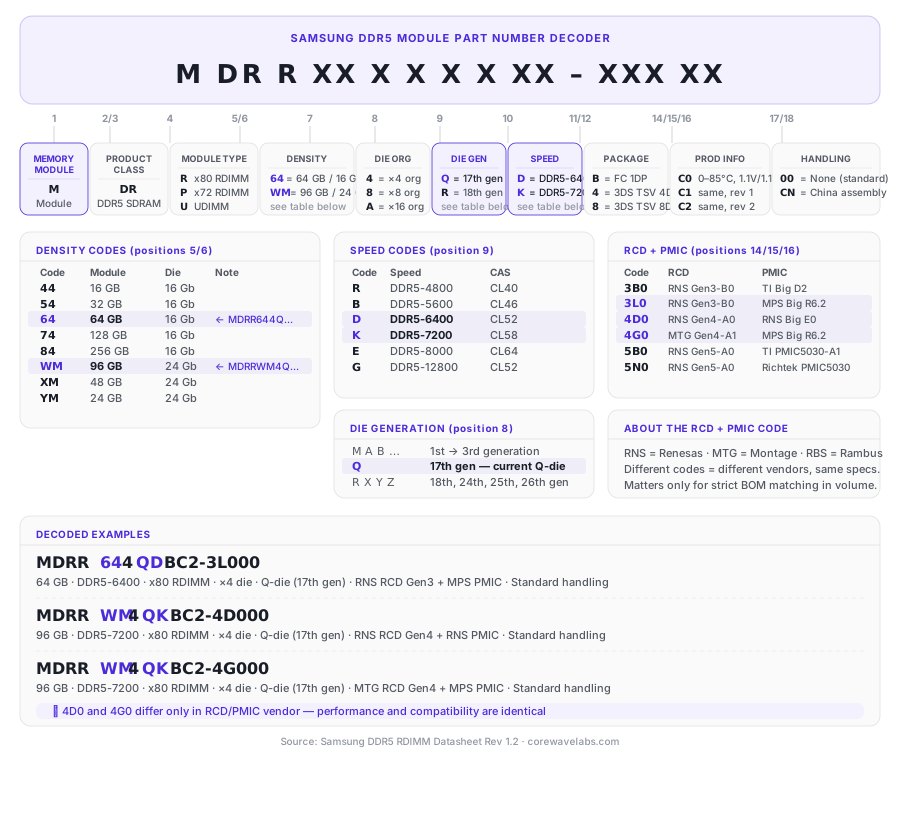
Samsung DDR5 memory part numbers are changing. In 2026, Samsung introduced a new DDR5 RDIMM part number format that uses codes like MDRR644QDBC2-3L000 and MDRRWM4QKBC2-4D000.
These new part numbers will gradually replace the older Samsung DDR5 naming style used on modules such as M321RAJA0MB2-CCP, M321RYGA0PB0-CWM and M321R8GA0EB2-CCP.
At first, the new format looks difficult to read. But each part of the code has a meaning: module type, capacity, die organization, die generation, speed, package, revision, RCD/PMIC combination and handling code.
How to Read the New Samsung DDR5 Part Number
A Samsung DDR5 RDIMM part number such as MDRR644QDBC2-3L000 can be broken down into sections.
MDRR identifies the module family. In this format, it refers to a Samsung DDR5 memory module, with R indicating an RDIMM module.
The capacity code tells you the module density:
| Code | Module Capacity | DRAM Die |
|---|---|---|
| 64 | 64 GB | 16 Gb |
| WM | 96 GB | 24 Gb |
| XM | 48 GB | 24 Gb |
| YM | 24 GB | 24 Gb |
The die organization code shows whether the DRAM is x4, x8 or x16.
The die generation code identifies the Samsung DRAM generation. In the examples below, Q refers to Samsung 17th generation Q-die.
The speed code is one of the most important parts:
| Code | Speed | CAS Latency |
|---|---|---|
| R | DDR5-4800 | CL40 |
| B | DDR5-5600 | CL46 |
| D | DDR5-6400 | CL52 |
| K | DDR5-7200 | CL58 |
| E | DDR5-8000 | CL64 |
Example: MDRR644QDBC2-3L000
The 64 code means 64 GB capacity using 16 Gb DRAM. The 4 means x4 die organization. Q indicates Samsung Q-die, and D means DDR5-6400. C2 identifies the product revision. 3L0 identifies the RCD and PMIC combination.
MDRR644QDBC2-3L000 = Samsung 64 GB DDR5-6400 RDIMM, x4, Q-die, standard handling.
Example: MDRRWM4QKBC2-4D000 and MDRRWM4QKBC2-4G000
The WM code means 96 GB capacity using 24 Gb DRAM. The 4 means x4 organization. Q identifies Samsung Q-die, and K indicates DDR5-7200.
The difference between 4D0 and 4G0 is the RCD/PMIC vendor combination. For most buyers, this matters only when strict BOM matching is required.
MDRRWM4QKBC2-4D000 = Samsung 96 GB DDR5-7200 RDIMM, x4, Q-die, RNS Gen4 RCD + RNS PMIC. MDRRWM4QKBC2-4G000 = Samsung 96 GB DDR5-7200 RDIMM, x4, Q-die, MTG Gen4 RCD + MPS PMIC.
Why Samsung Changed the DDR5 Part Number Format
The older Samsung DDR5 part numbers such as M321RAJA0MB2-CCP were widely used across server memory product listings and OEM qualification references.
The new MDRR-style format encodes more detail directly in the part number. It makes newer DDR5 modules easier to decode once you know the structure, especially for 24 Gb-based capacities such as 96 GB RDIMMs.
For buyers, the main things to check are: capacity code (64 or WM), speed code (D for DDR5-6400 or K for DDR5-7200), module type (RDIMM), and RCD/PMIC code for strict part matching.
Products Referenced in This Guide
MDRR644QDBC2-3L000 Samsung 64 GB DDR5-6400 RDIMM
MDRRWM4QKBC2-4D000 Samsung 96 GB DDR5-7200 RDIMM
MDRRWM4QKBC2-4G000 Samsung 96 GB DDR5-7200 RDIMM
Need help matching a Samsung DDR5 RDIMM to a server or OEM part number? Contact CoreWave Labs and we can verify the correct module before ordering.
Weekly Newsletter
DRAM & SSD Market Intelligence
Weekly pricing levels, stock quantities & EU/global availability on DDR4/DDR5 and Enterprise SSDs.

Further Reading
Samsung’s 2026 Labour Dispute: Supply Chain Lessons for Memory and SSD Buyers

How a Strait of Hormuz Disruption Could Impact the Semiconductor Supply Chain